
How can I go faster? Scooter not reaching its advertised top speed
Last updated November 18, 2026
A new scooter is speed limited out of the box to meet most local regulations (for example, a scooter that will not go past 12 mph or 20 km/h). The limit is adjustable in the app settings: the rider is prompted to set it at the first connection and can change it any time later.
First compare with the scooter's rated top speed
The speed the app lets the rider set can be higher than the scooter's rated top speed. A scooter that reaches its rated top speed on flat ground is working as it should, even when the app shows a higher number, and no setting makes it go faster. The rated top speed is on the model's product page.
Example: on the Apollo City Pro 2022 the app's speed setting goes up to 37 mph (60 km/h), while its rated top speed is 32 mph (51.5 km/h). A City Pro 2022 that reaches about 32 mph is at its rated speed. The City Pro 2022 has no Ludo Mode.
Did the number drop, for example from 45 to 28? Check the unit
The app and the scooter's display show speed in km/h or in mph, and the same speed reads as two different numbers: 45 km/h is 28 mph, and 40 km/h is 25 mph. If your top speed seems to have fallen from the larger number to the smaller one, the scooter is as fast as before and only the unit changed. To change it back, open the Apollo app while connected to the scooter, go to Settings, then Language & Units, and choose km or miles.
If you have not checked the app speed settings yet:
Open the Apollo app, select Sport mode and set the speed value to its maximum.
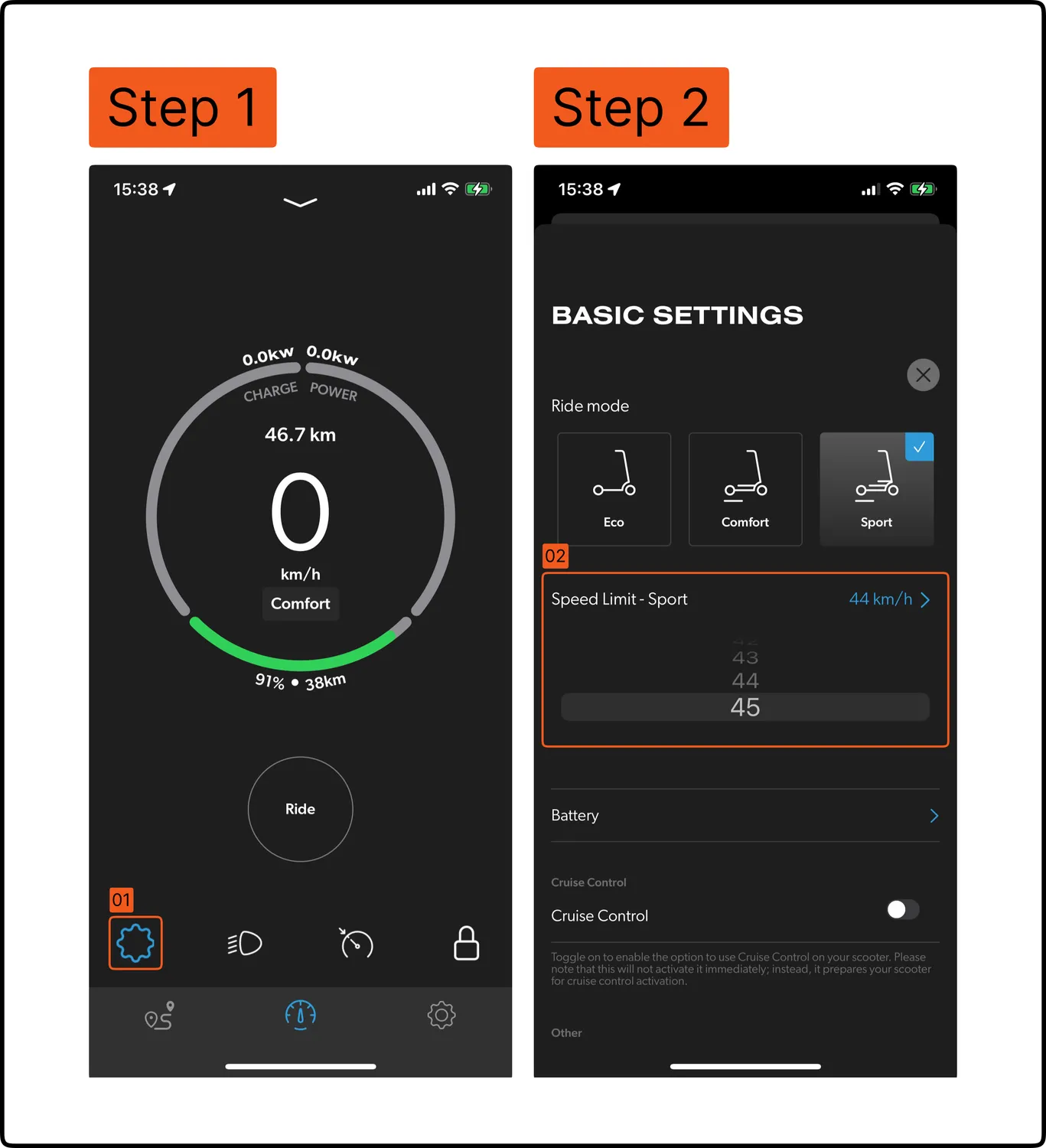
Go to Advanced Settings and set the Top Speed Limit to its maximum value.
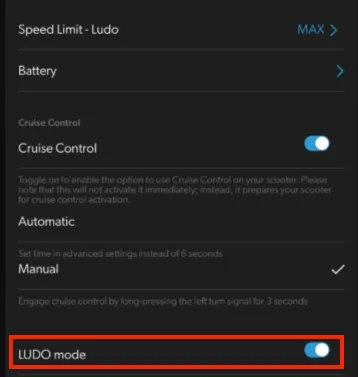
Enable Ludo Mode, from the app or by pressing the power button 3 times quickly while the scooter is on. On the Apollo Go 2025 and the Apollo Phantom 2.0 the scooter must be in Ludo Mode to reach the top speed set in step 2.
On the Apollo Phantom 2.0 and the Apollo Go, gears 1, 2 and 3 have preset top speeds that cannot be set higher in the app.
A factory reset puts the top speed and the riding mode back to their defaults: set them again after one.
In Australia, New Zealand and Austria the top speed is hard capped based on the location in the rider's profile, so the app settings alone do not raise it: see Speed question from Australia, Austria or New Zealand: capped at 25 km/h, how to go faster, change the top speed setting.
If all settings are maxed out and Ludo Mode is on but it is still slow
See Slower than the advertised top speed in real riding: advertised vs real-world top speed for what lowers top speed on a real ride (battery level, weight, slopes and wind, temperature, tire pressure). Also check that both brake levers return fully to rest and that the wheels spin freely by hand.
Apollo advises compliance with local speed regulations and is not liable for any consequences.